
User permissions
User permissions
Permissions on the Intelligence Center are granular controls on user access
to features and data. They're predefined,
and assigned to users through roles.
Permissions are usually named with the convention <verb> <object>, where:
<verb>describes the action allowed, and<object>describes the object being acted on.
To see a full list of permissions:
- make a
GET /permissionsrequest, - or sign in on the Intelligence Center and
go to Settings > User management > Permissions
The table of permissions below
covers permissions as they are applied in the Intelligence Center.
Control access through groups, roles, and permissions
What a user is allowed to access is determined by a combination of:
-
Groups
Groups are used to organize users and
defines the resources that its members are allowed to access. -
Roles
Roles are sets of permissions that determine the tasks a user assigned that role can perform.
The following flow chart is an example of
how to decide what to assign to your user
to give a certain level of access:
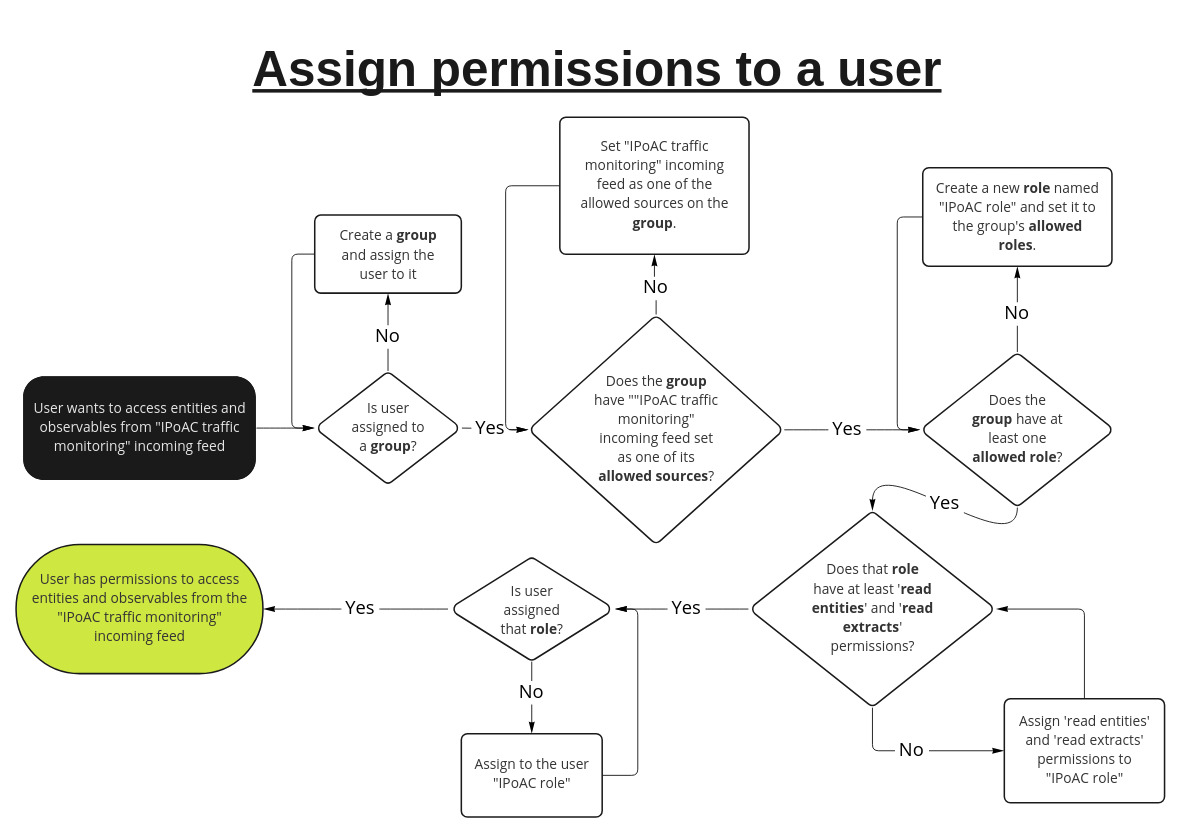
Permissions flow chart
Groups
Groups allow you to name the resources
it's members are allowed to access.
You can set for a group:
Allowed sources
Allowed sources are sources that
members of the group can access data from.
An allowed source has two properties:
- the source
- a TLP color
Sources can be:
- Groups. By default, a group has itself as an allowed source. You can add other groups as allowed sources to give group members access to intelligence created by members of that group.
- Incoming feeds. Entities and observables that are ingested through an incoming feed have their source automatically set to the name of the incoming feed.
- Enrichers. When an observable or entity is enriched, the resulting entities and observables have their source set to the name of the enricher used.
TLP colors set for a source determines the most restrictive TLP (inclusive) that that members of this group can access. By default, this is set to RED for a source. This means that group members can access objects with TLP colors WHITE, GREEN, AMBER, and RED.
Setting an allowed source's to a less restrictive TLP color would prevent group members from accessinng objects with more restrictive TLP colors. For example, setting the TLP color for an allowed source to
GREENwould mean that objects with TLP colorsAMBERandREDcannot be accessed by group members.
Allowed roles
Groups must specify a set of roles that group members can be assigned to.
Setting allowed roles for a group does not actually assign the role to group members. You must first add roles to the allowed roles of a group, then explicitly assign those roles to the user.
Roles
Roles are sets of permissions that grant read
or modify access to a given resource.
modify permissions grant both read and modify permissions
for a resource.
A role can contain any number of permissions. Users inherit their permissions from the roles that they are assigned.
Table of permissions
The following table describes permissions as
they are applied in the Intelligence Center.
Permissions required for each endpoint is documented in the API reference.
All -modify permissions already
include -read level permissions.For example, modify users permissions
include read users permissions,
so you can assign a user modify users
without read users.
Permission dependenciesSome permissions depend on other permissions.
For example, a user must first have read-tickets permissions in order to be able to read task comments with read ticket-comments permisisons.
Permission | Description | ||||||||||||||
|---|---|---|---|---|---|---|---|---|---|---|---|---|---|---|---|
install knowledge-packs | Install To install knowledge packs in the UI, | ||||||||||||||
lock/unlock users | Unlock or deactivate user accounts. Also requires modify users. | ||||||||||||||
modify blob-uploads | Manually upload filesin the UI through + > Upload. Different from files permissions. | ||||||||||||||
modify collaborators | Add and remove users in workspaces. Also requires read workspaces. | ||||||||||||||
modify configurations | Modify the following settings in the Intelligence Center UI:
| ||||||||||||||
modify knowledge-packs | View, create, and modify | ||||||||||||||
modify discovery-rules | View, create, modify, enable/disable, and run Requires additional permissions to access some fields:
| ||||||||||||||
modify draft-entities | View, create, and modify | ||||||||||||||
modify enrichers | Edit, enable, and disable | ||||||||||||||
modify enrichment-rules | View, create, modify, enable/disable, and run Requires additional permissions to access some fields:
| ||||||||||||||
modify entities | View, create, and modify Requires additional permissions to see all fields and options. The following is a non-exhaustive list of min. permissions:
| ||||||||||||||
modify extracts | View, create, and modify | ||||||||||||||
modify files | Users can:
To perform these tasks on files attached
| ||||||||||||||
modify graphs | View, create, and modify To save a graph, users must:
| ||||||||||||||
modify groups | View, create, and modify To be able to see and modify groups on the UI, users must either:
To manage additional group properties, users require at least:
| ||||||||||||||
modify incoming-feeds | View, create, modify, and run To create a new incoming feed in the UI,
| ||||||||||||||
modify intel-sets | View, create, and modify To view dataset, users also require at least:
To create datasets, users also require at least:
| ||||||||||||||
modify outgoing-feeds | View, create, modify, and run To create a new outgoing feed, users must also have at least:
For feeds that create packages | ||||||||||||||
modify retention-policies | View, create, modify, and run To create policies, users must also have at least:
| ||||||||||||||
modify roles | View, create, and modify To create and modify roles, users must also have at least:
To be able to see and modify roles on the UI, users must either:
| ||||||||||||||
modify rules | View, create, modify, enable/disable, and run: To create and modify rules,
| ||||||||||||||
modify tasks | View and terminate To interact with system jobs | ||||||||||||||
modify taxii-services | View, create, and modify To interact with TAXII service configuration | ||||||||||||||
modify taxonomies | View, create, and modify | ||||||||||||||
modify ticket-comments | View, create, and modify To be able to add
| ||||||||||||||
modify tickets | View, create, and modify To be able to see a task in the UI, users must either:
Users need additional permissions to access some UI fields in tasks:
| ||||||||||||||
modify users | View and deactivate users. To be able to create and modify users, you must:
| ||||||||||||||
modify user-groups | Add or remove existing users from a group. Requires at least:
| ||||||||||||||
modify user-roles | Add or remove roles from a user. Requires at least:
| ||||||||||||||
modify workspace-comments | View, create, and modify To interact with comments in workspaces,
| ||||||||||||||
modify workspaces | View, create, and modify Requires additional permissions to access some features:
| ||||||||||||||
read audit-trail | View the audit trail To see | ||||||||||||||
read attack | View MITRE ATT&CK Users must have this permission and | ||||||||||||||
read blob-uploads | View manually uploaded files. Different from files permissions. To see manually uploaded files at | ||||||||||||||
read collaborators | View collaborators of a workspace. | ||||||||||||||
read configurations | View settings in | ||||||||||||||
read knowledge-packs | View knowledge packs. Requires additional permissions to | ||||||||||||||
read content-blocks | View packed outgoing feed packages. | ||||||||||||||
read content-types | View available content types when creating feeds. | ||||||||||||||
read destinations | View the list of outgoing feeds where Destinations are displayed in the UIas a section in the Overview To see an entity’s or observable’s destinations | ||||||||||||||
read discovery-rules | View discovery rules. To see discovery rules in the UI, | ||||||||||||||
read draft-entities | View draft entities tab | ||||||||||||||
read enrichers | View enrichers. | ||||||||||||||
read enrichment-rules | View enrichment rules. To see enrichment rules in the UI, | ||||||||||||||
read entities | View entities. Requires additional permissions to see all fields and options. | ||||||||||||||
read extracts | View observables. Requires additional permissions to see all fields and options. | ||||||||||||||
read files | View files uploaded to a workspace. Users must be at least a collaborator on a workspace | ||||||||||||||
read graphs | View graphs. Users must be at least a collaborator on a workspace | ||||||||||||||
read groups | View groups. To see groups in the UI, | ||||||||||||||
read incoming-feeds | View incoming feeds. Requires additional permissions to see all fields and options. | ||||||||||||||
read intel-sets | View datasets. To see the contents of a dataset, | ||||||||||||||
read notifications | View notifications. | ||||||||||||||
read outgoing-feeds | View outgoing feeds. Requires additional permissions to see all fields and options. | ||||||||||||||
read permissions | View the list of available permissions. To see the list of permissions in | ||||||||||||||
read retention-policies | View data retention policies. | ||||||||||||||
read roles | View roles. To see the permissions that a role includes, | ||||||||||||||
read rules | View observable and entity rules. Requires additional permissions to see all fields and options. | ||||||||||||||
read sources | View the list of sources. | ||||||||||||||
read tasks | View system jobs. | ||||||||||||||
read taxii-services | View TAXII services. | ||||||||||||||
read taxonomies | View the taxonomy list. | ||||||||||||||
read ticket-comments | View To be able to view
| ||||||||||||||
read tickets | View, create, and modify To be able to see a task in the UI, users must either:
Users need additional permissions to access some UI fields in tasks: | ||||||||||||||
read traceback-logs | View traceback logs displayed in the UI when an error occurs. | ||||||||||||||
read transports | View available | ||||||||||||||
read users | View the list of users. | ||||||||||||||
read workspace-comments | View To interact with comments in workspaces,
| ||||||||||||||
read workspaces | View Requires additional permissions to access some features. | ||||||||||||||
reset password | Allows user to force reset another user’s password. Also requires at least modify users. |
Updated over 1 year ago